

Our sales setup is super lean.
It’s me, a small group of overseas agents, and my CEO, who I do pipeline reviews with and pull into deals when needed.
Systems are also pretty lean. Clay/Linkedin for prospecting, Lemlist for Sales execution, and Google Sheets for pipeline management. We had Salesforce, but couldn’t justify the expense since we only really used it for pipeline reviews…
All in, tools are less than $10k a year.
This makes it easy to experiment with AI. We test workflows constantly. If something works, we keep refining it. If it doesn’t, we adjust or abandon it entirely.
It’s a bit of whack-a-mole, but it works because we aren’t steering a huge ship. We don’t have layers of process documentation, enablement, KPI tracking, or cross-functional alignment meetings.
That’s very different from operating a large GTM organization. More people, more dependencies, and more legacy systems make change significantly harder to implement.
For those teams, the question isn’t really how to “adopt AI.” The harder question is how to introduce automation into a live revenue engine without disrupting the parts that are still working.
Why Ai Has Become a Leadership Problem
For much of the last decade, inefficiencies inside GTM organizations were relatively easy to live with.
For every obstacle the solution was to hire more people or add another tool. As long as growth was rewarded and capital was cheap, those tradeoffs weren’t painful.
This changed when interest rates rose, capital became scarce, and companies needed to operate with more discipline. Then things accelerated once AI proved itself to be a real productivity driver.
Boards expect companies to grow while staying disciplined about cost and margin.
CROs now need to implement AI quickly - often without a clear plan. For many, the default response has been testing new tools, running pilots, and layering automation into existing workflows.
The problem is that most of these efforts are treated as tooling exercises rather than workflow redesign. New platforms get introduced, but day-to-day behavior barely changes. Instead of reducing complexity, automation just adds another layer on top of existing processes.
But some organizations have adapted far better than others.
After speaking with one CRO who has seen meaningful productivity gains from AI, a fairly clear, potentially repeatable set of operational principles emerged.
Step 1: Mapping the Existing System
Before any tooling was introduced, the CRO assigned an analyst to document how all the work was being done across GTM.
That meant mapping workflows end to end. How reps prepared for calls, how account research was performed, how leads were routed, how follow-up happened, where information lived, where time was being spent, and where bottlenecks existed between teams and systems.
Most of these processes had evolved organically over time. Some were highly manual, some were partially automated, and many depended on tribal knowledge that had never been formally documented.
Once the workflows were mapped, the analyst presented them back to the CRO. Together, they prioritized which processes were worth addressing first based on time spent, tool fragmentation, and potential business impact.
Only then did the AI conversation really begin.
Instead of asking “where can we use AI?”, the discussion focused on a few questions: Which workflows should be redesigned entirely? Which tasks were repetitive enough to automate? What would successful adoption actually look like? And how would impact be measured once the new system was implemented?
Step 2: Prioritize Workflows to fix
Going one workflow at a time, and implementing automation end-to-end before moving to the next process, was the only way to generate meaningful efficiency gains. Trying to transform the entire GTM organization at once usually created more complexity than leverage.
The iterative cycle of implementation, adoption, optimization, and refinement proved far more effective. The first workflow prioritized was highly manual, making the potential impact obvious while also limiting risk since it did not directly affect customers as the system matured.
Expansion reps were spending a meaningful portion of their day preparing for calls. This meant moving between systems to assemble context. CRM for account details, product tools for usage, call recordings in another place, notes in spreadsheets, email history somewhere else.
The fragmentation may seem obvious, but when you’re in execution mode, it’s just part of the gig. Especially when its a documented system that has proven to work, everyone is hitting their numbers, etc.
The analyst helped the reps understand the current workflow, made the inefficiencies visible to the broader organization, and clearly showed how redesigning the process would eliminate wasted work. That proved far more effective than simply telling people to use new Ai tools to solve problems they didn’t fully understand.
Step 3: Creating the Right to Change the Workflow
Because of the level of inefficiency, the analyst made the decision to replace the workflow entirely rather than optimize around it.
They built an assistant on top of GPT, and embedded it directly in the CRM to surface all the information reps needed automatically, and in one place.
Implementing the tooling wasn’t enough. Left on their own, reps would naturally revert back to the old process the moment this copilot (inevitably) didn’t give them exactly what they wanted.
But the CRO gave the analyst the authority to mandate adoption and remove the old workflow entirely. The system still needed refinement over time and forcing usage created the feedback loops necessary to improve it.
Without that level of authority/accountability below the C-suite, automation tends to accumulate without changing behavior. Teams keep legacy workflows “just in case,” and the new system becomes optional.
Step 4: Continual Optimization
Once the assistant was embedded into the CRM and reps fully adopted the new process. The analyst’s role shifted from workflow redesign to continual optimization.
Models improved, new tools entered the market and as reps used the system, new edge cases appeared and additional context accumulated inside the workflow itself.
That meant the system needed constant tuning.
Prompts were adjusted. Context passed into the assistant changed over time. Certain tools were replaced as better options emerged. In some cases, entirely new workflows became possible simply because the underlying models improved.
The organizations getting the most leverage out of AI are treating it as an operational system that evolves continuously alongside the technology itself.
What Changes When This Is Done Well
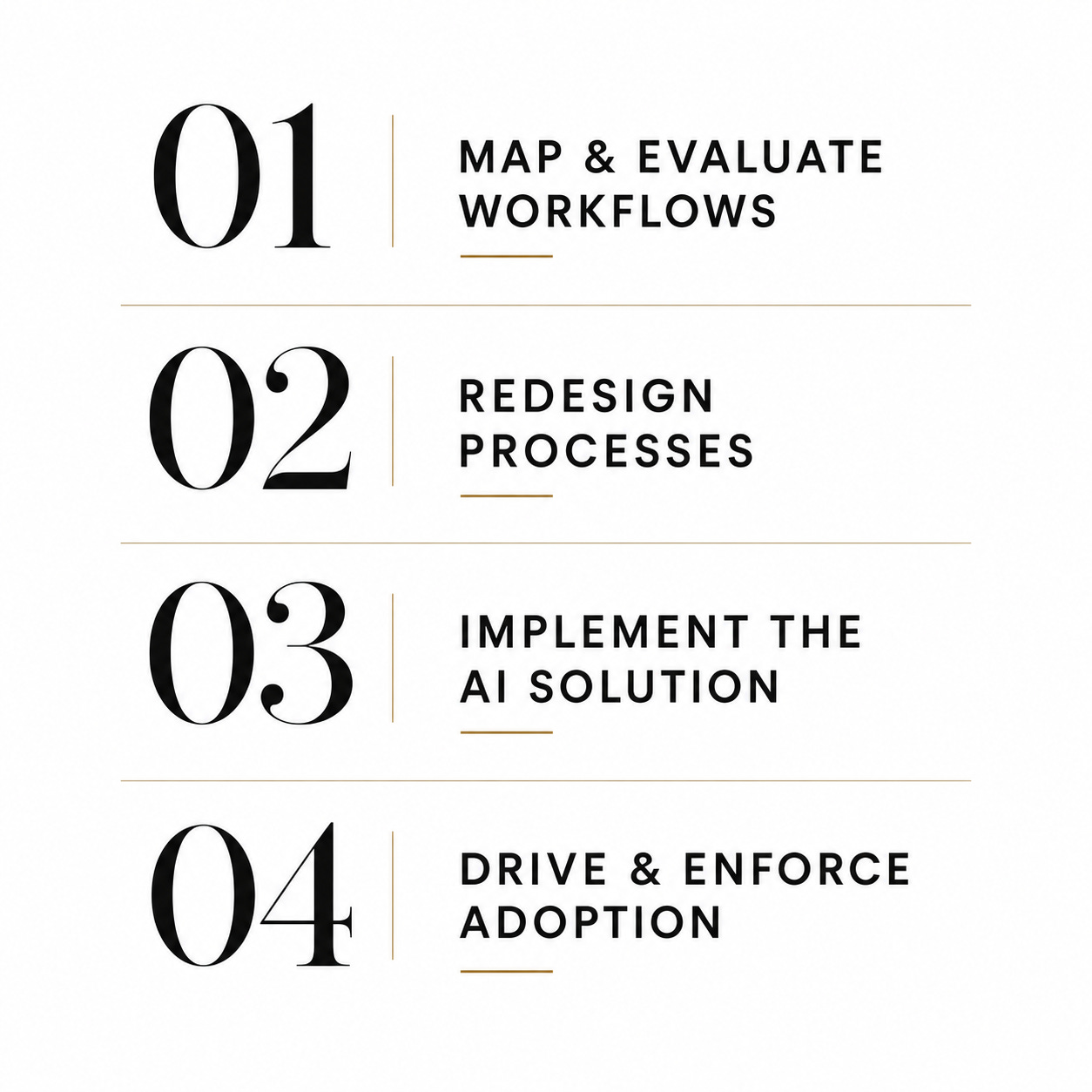
The CROs (and frankly CEOs) getting the most leverage from AI are repeating this process across the business. Map the workflow, redesign it, implement the new system, mandate adoption, then move to the next source of inefficiency while continuing to refine the automations already in place.
Over time, the impact starts to compound. Small workflow improvements across dozens of operational processes eventually create meaningful change.